Concepts Manual · The journey
The problem Baybo solves
Anyone who invests can almost never answer the one question that matters: was it worth getting involved, instead of doing nothing?
And it isn't for lack of information — it's the opposite. People have money scattered across several places (a brokerage, the bank, a crypto wallet, an account abroad), each with its own app, its own number, its own “return”. Even so, they can't say whether they're doing well. It could be someone who only taps “Save” in their bank app, or someone who's been trading at a brokerage for years and is certain they know what they're doing. Both fall into the same trap.
The trap is profit. Turning a profit looks like proof it worked, but profit alone says nothing. Making 20% in a year in which the dollar rose 30% is losing. Earning the same in a CDB (a Brazilian fixed-income deposit) that a savings account would have earned is tying with the laziest thing there is. The number that looks like a win almost always hides a loss — and that loss is exactly what no tool shows.
How each tool deceives you
- People who invest through a brokerage see the result in reais or dollars — a number that mixes what the person did with what the market did on its own. If the asset fell, the balance falls with it, and there's no way to know what actually matters: did you end up better than if you'd simply left it alone, or worse?
- Dollar investors live the same thing: the return shows up tangled with the exchange-rate swing. The tool doesn't separate “the investment grew” from “the dollar went up”, and the exchange rate becomes the hidden cost no one isolates.
- Those who leave it in the bank get a return number that often isn't the real one. The bank advertises the nominal rate of a single product — the pretty number — not how much your money, added up and compared against the basics of “doing nothing”, actually moved forward.
And then the grunt work begins. To try to answer what no app answers, the person opens a spreadsheet. Then another. They note deposits, paste in quotes, try to adjust by the CDI, get the exchange-rate math wrong, forget to update — and end up with a heap of spreadsheets nobody can keep up, that in the end still doesn't answer the question properly.
Solving this means having one single screen, an honest one, that answers it all at once: how much you put in, how much you have, and — in reais and in each account's own currency — how much more (or less) you have today than if you'd left the same money alone. No manual spreadsheet, no tracking every individual asset, and no pretty number hiding the loss.
Baybo asks each account one thing only: “how much is the total worth today?”. It looks at the result; it never touches anything, and never peeks at what's inside.
What it doesn't need to know
It hasn't the slightest intention — nor need — to know what's inside your brokerage. It doesn't care whether in there you hold Petrobras shares, real-estate funds, Treasury bonds, a CDB or a dollar balance — nor what trades you made. That's all it needs to tell you whether it was worth it — and it's all it wants to know.
Concepts Manual · The journey
Not another spreadsheet
This is one of Baybo's biggest differentiators: you barely touch it. Once a month is enough; if you're keen, once a week in two minutes. No daily homework.
Every tracking tool dies the same way — it demands you feed it nonstop (just ask the spreadsheet you abandoned in the third month). Baybo asks for only two numbers:
- How much came in or went out — a deposit or a withdrawal.
- How much the total is worth today — the balance.
Never what is inside. And each one arrives the easiest way.
How each number gets in
The balance you update with a screenshot of your bank's screen (Baybo reads it and you confirm), by typing it, or — if it's a connected brokerage — on its own; the deposits and withdrawals you type in or send straight from the statement via the app's “Share”, without hunting for a file.
Until a new balance exists, Baybo keeps your last balance and keeps doing the math on its own — forgetting for a week breaks nothing, and when too long goes by it reminds you.
It's the opposite of a spreadsheet: there, the more you fiddle, the better your control; here, the less, the better. It's not the product being lazy — it's consistency with the thesis that, with money, the best move is almost always to stop fiddling.
Concepts Manual · The journey
Why your broker's app isn't enough
Your broker does compare — against dozens of indexes: CDI, Ibovespa, the dollar. But it compares the easy way: rate against rate. “CDI returned 10%, you returned 12%.” It looks like an answer, but it isn't one.
Because that math ignores what matters most: how much you put in and when. A big deposit at the wrong time, a withdrawal midway, your timing — none of it enters a percentage comparison. The pretty % can hide that, with your actual money, you'd have more by doing nothing.
Baybo does a different calculation. It takes your deposits, on the exact dates they happened, puts the same money into the alternative, and answers in reais: “you have R$ X more (or less) than you would have”. It's not “the index went up this much” — it's your pocket against the same money left alone.
Exactly how much, and how you're doing overall, come next; the math behind each line is in the appendix.
Concepts Manual · The journey
The advantage: the number that matters
You already have your total for today. Now Baybo runs that same calculation — the path you just saw — for each alternative: the same money, on the same dates, as if it were CDI or as if it were the dollar. And it compares with what you actually have.
The result is the advantage, in reais: “you have R$ X more (or less) than you would have in the CDI” — and the same for the dollar. It's the number that answers, with no runaround, the question from the start: was it worth getting involved?
You can turn a profit and still have lost. If your money earned R$ 2,000, but in the CDI it would have earned R$ 3,000, you had a profit and lost to a boring savings account. Profit says you grew; only the advantage says whether it was worth it.
To read it all at a glance, Baybo sums it up in a Level — a simple ladder: are you beating the CDI? And the dollar? The more references you beat, the higher the level. (It describes your result, never investment advice.)
The advantage can be negative — and Baybo shows it to you anyway. It's not to punish you; it's so you can decide, with the number in front of you, whether what you do is worth more than doing nothing.
Want to see the exact math, number by number? → The math, in the open
Concepts Manual · When all is said and done
When all is said and done
In the end, Baybo believes something unpopular: almost everyone would earn more by doing nothing — and those who fiddle think they're the exception. It doesn't tell you to stop or to keep going; it just sets your result next to “doing nothing” and lets the number decide. And it can do that because it sells nothing, charges nothing per trade, and has nothing to gain from your answer — unlike almost everyone who talks to you about money.
Appendix · for those who want to check
The math, in the open
Baybo has nothing to hide. Every number it shows comes from a simple calculation — and it's all right here. If you like, take the formula, drop it into your spreadsheet and redo it. If you trust the number and just want to follow along, you can skip this: this part is for the skeptic.
Three rules apply to everything:
- Locked on the day. Each record stores the exchange rate of the day it was made. If the rate is corrected later, your past doesn't change.
- No making things up. Between two declared balances, Baybo spreads the period's return as a constant daily ramp; after the latest declared balance, it carries the last value forward as a step.
- No guessing rates. Missing a day's rate? The number is flagged as provisional, instead of using a made-up one.
What you have, put in, and profited
- What you have: for each account, the last balance you declared, in its own currency, converted to reais at the day's rate. Summed across all accounts.
have = Σ (account balance × day's rate) - What you put in: each deposit is recorded in the account's native currency. If it came in another currency, it is converted to the account currency on the record date; when reading the report, Baybo converts to reais and adds everything up (a withdrawal counts as negative). Returns don't count — money the account generated on its own isn't money you put in.
- Profit:
have − put in. It says you grew; it doesn't say whether it was worth it.
The ghost wallet
To say “how much you'd have if it were CDI or the dollar”, Baybo builds a make-believe wallet with your money: each of your deposits, on the exact day it happened, buys the alternative at that day's price.
quantity = deposit in reais ÷ alternative's price that day
Add up the quantity from all deposits and multiply by today's price: that's how much you'd have. (The CDI enters as a “price” that only goes up.)
The two numbers that look like one
Here's what confuses everyone — including apps that should know better. There are two numbers:
- The rate (“how much it returned”): the percentage your money returned, ignoring how much you put in and when. It can lie.
- The advantage (“how much more you have”): your balance today minus the ghost wallet. It's Baybo's number, and the honest one: it uses your real money, on your dates.
advantage (in R$) = what you have − what you'd have advantage (in %) = what you have ÷ what you'd have − 1
The advantage is not “my rate minus the dollar's rate”. It looks the same and it isn't:
You put in R$ 1,000 and, in the first year, it returns 30% → R$ 1,300. In the CDI, that R$ 1,000 would have become R$ 1,100 — you're ahead. Then you deposit R$ 100,000 (now you have R$ 101,300). The next year you drop 5%, and the CDI rises 10%.
- By the rate: you returned +23.5% overall; the CDI, +21%. It looks like you won.
- By the advantage: you have R$ 96,235; in the CDI you'd have R$ 111,210 — R$ 15 thousand less.
The rate lied because your good call was on R$ 1,000 and your bad one on R$ 100,000. The advantage compares the money, not the percentage.
The Level
The Level is just the quick read of the advantage. Baybo checks, in this order, whether you're ahead of the CDI and then the dollar — and your level goes as far as you get without failing. Beat the dollar but lose to the CDI? You're still on the bottom step (the order starts at the CDI). Passed the references three months running? Top level.
Step by step
Update the balance
Updating the balance is telling Baybo how much the account is worth today — the second of the two numbers it asks for. Once a month is enough; until a new balance exists, Baybo keeps the last balance and keeps doing the math on its own.
On a synced account, you do nothing: the balance arrives on its own from the brokerage. This flow is for a manual account.
Path A — by typing
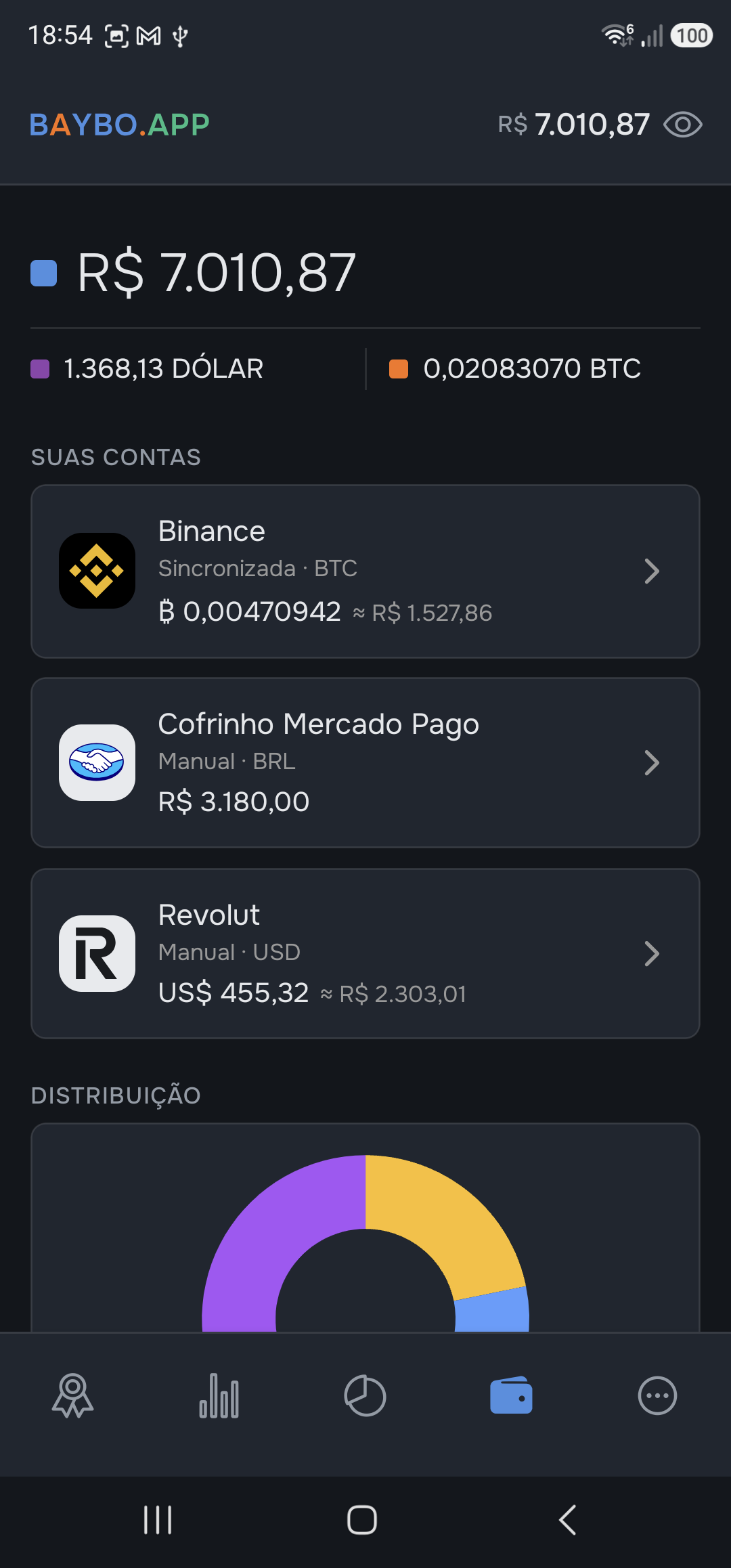
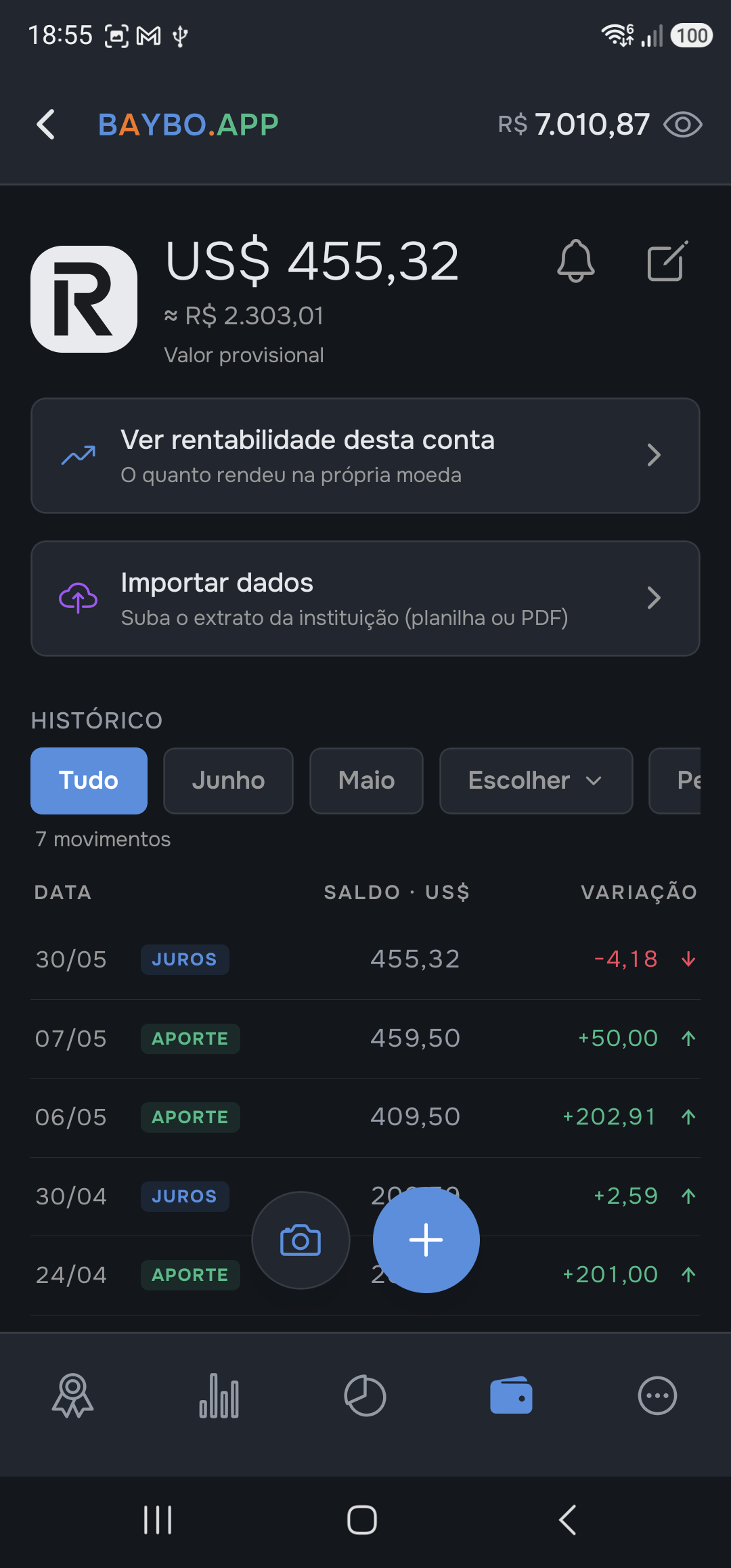
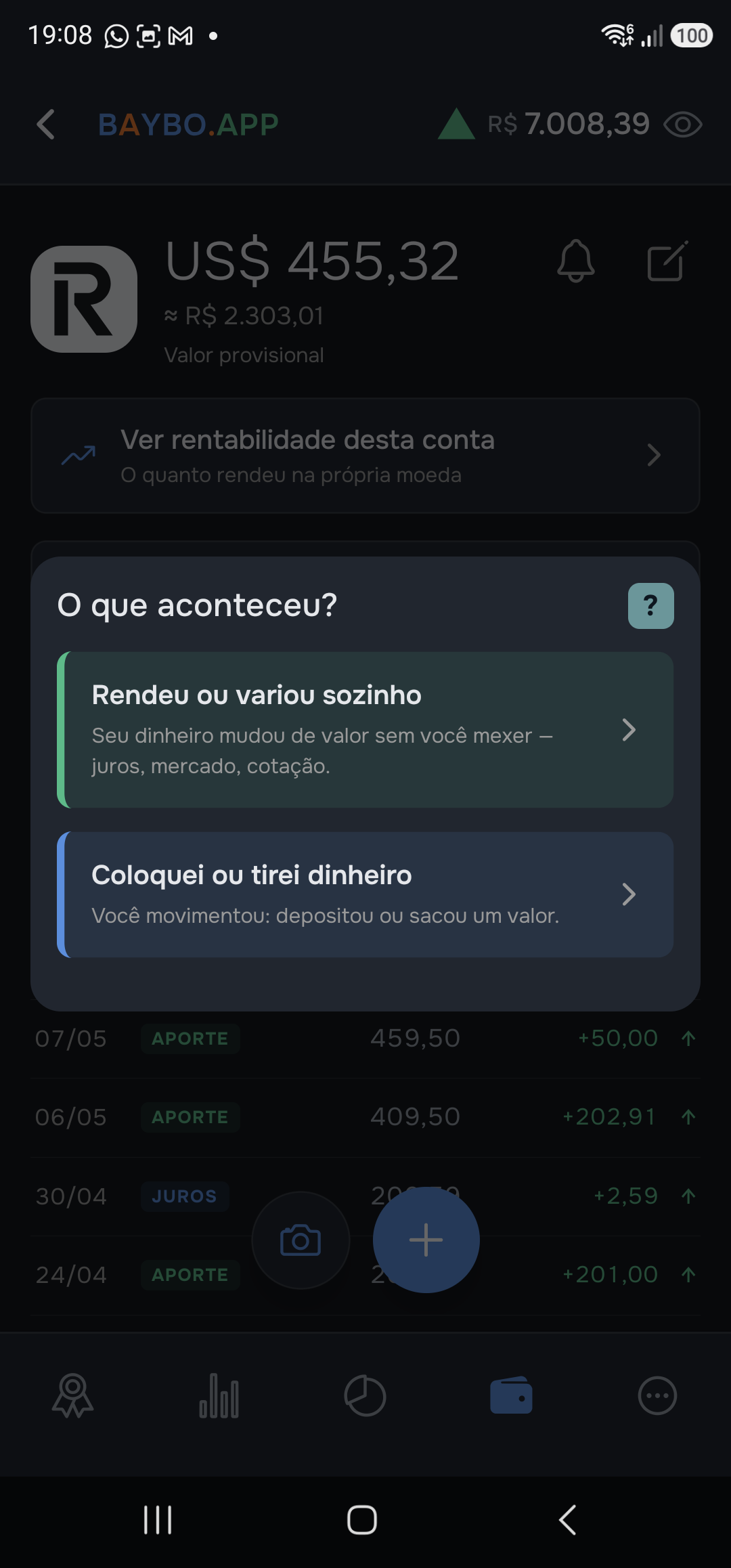
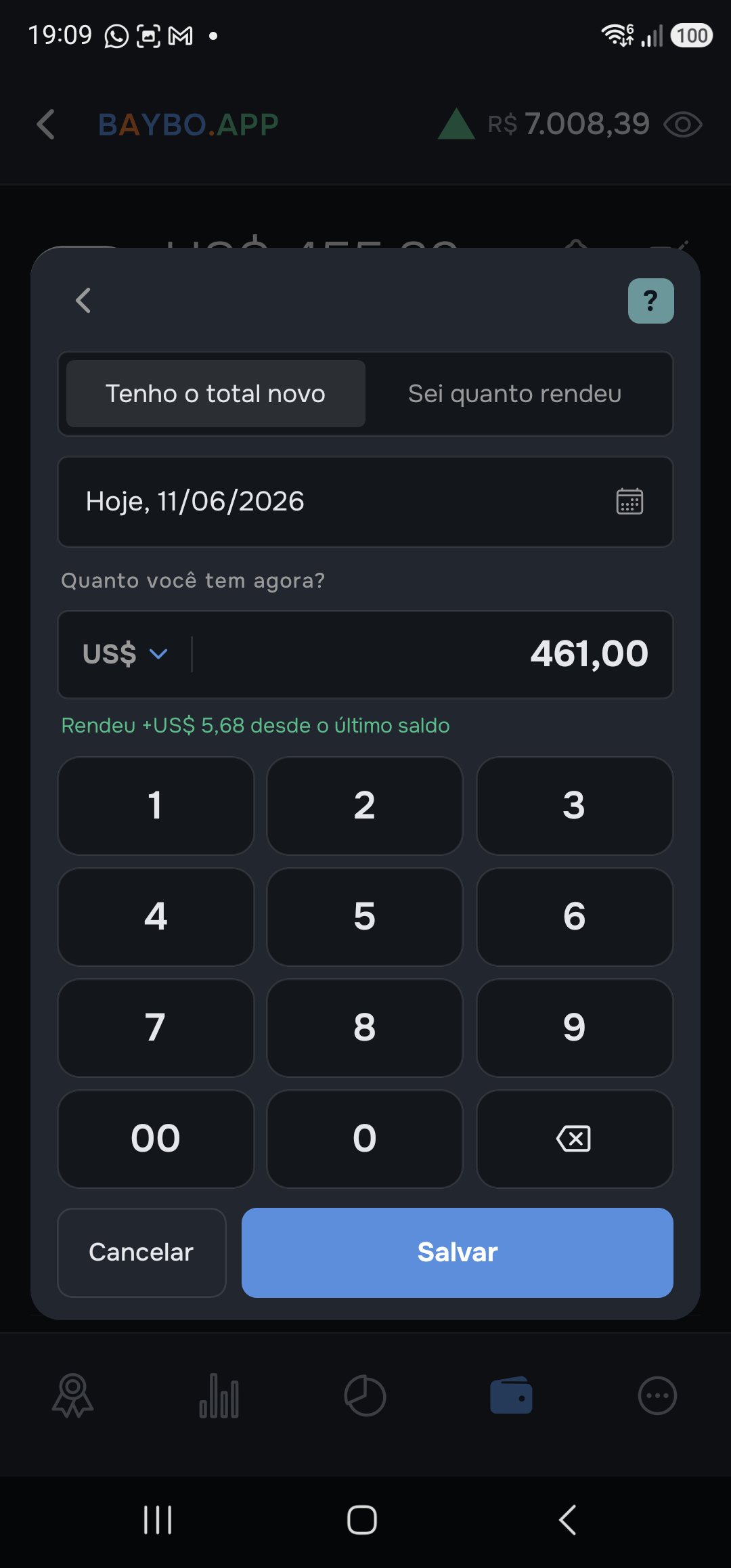
- In the Accounts tab, tap the account.
- In the statement, tap the + button in the lower corner.
- Baybo asks “What happened?”. Choose “It grew or moved on its own”. If you added or withdrew money, pick the other one — that's a deposit or withdrawal, not a balance update.
- Leave “I have the new total” selected and type the total your bank app shows. If the bank only showed how much it earned (e.g. “earned R$ 1.20”), switch to “I know how much it earned” — Baybo adds it up for you.
- Check the confirmation line — “Grew +X since the last balance” — and tap Save.
The date defaults to today; if the balance you saw is from another day, tap the date and change it.
Path B — by photo
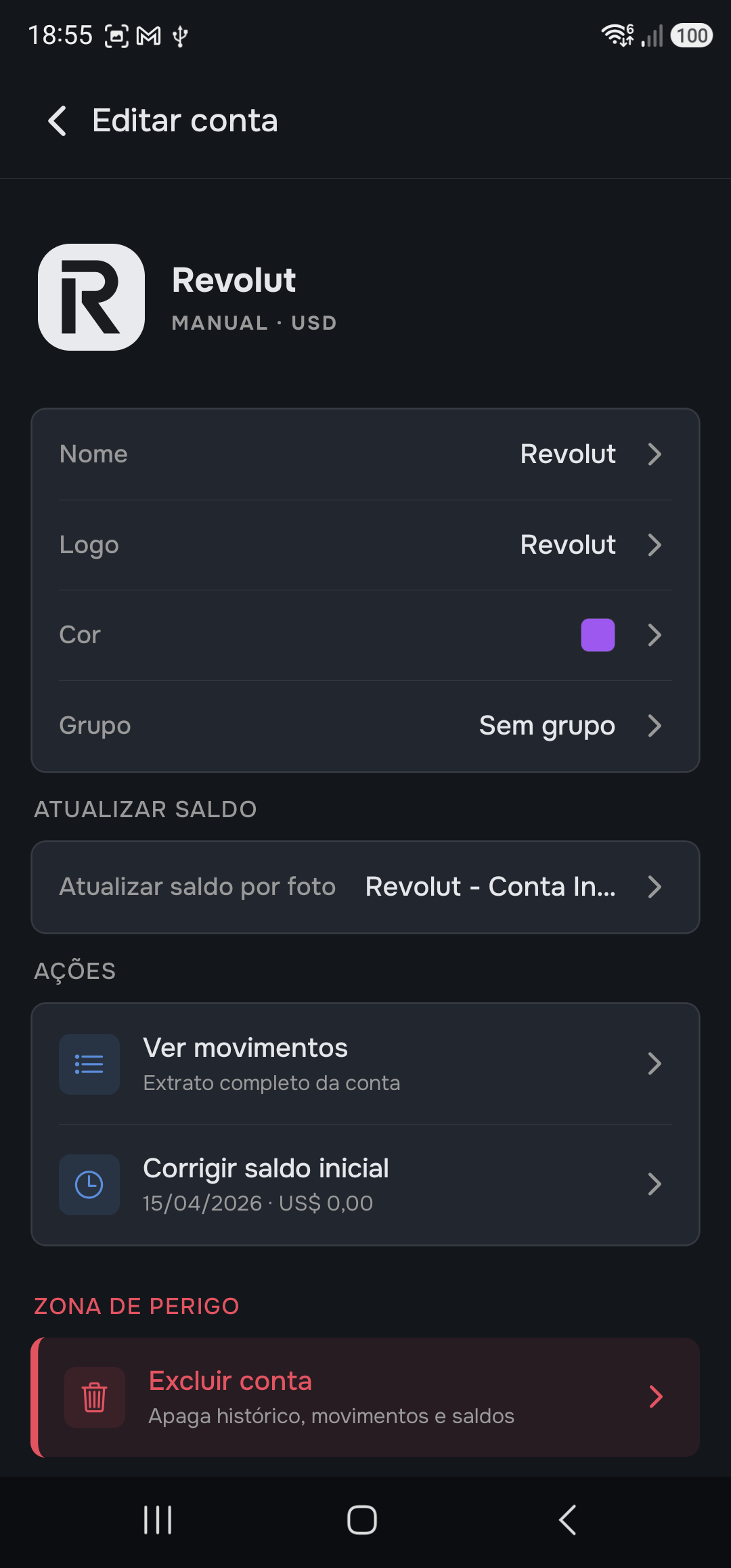
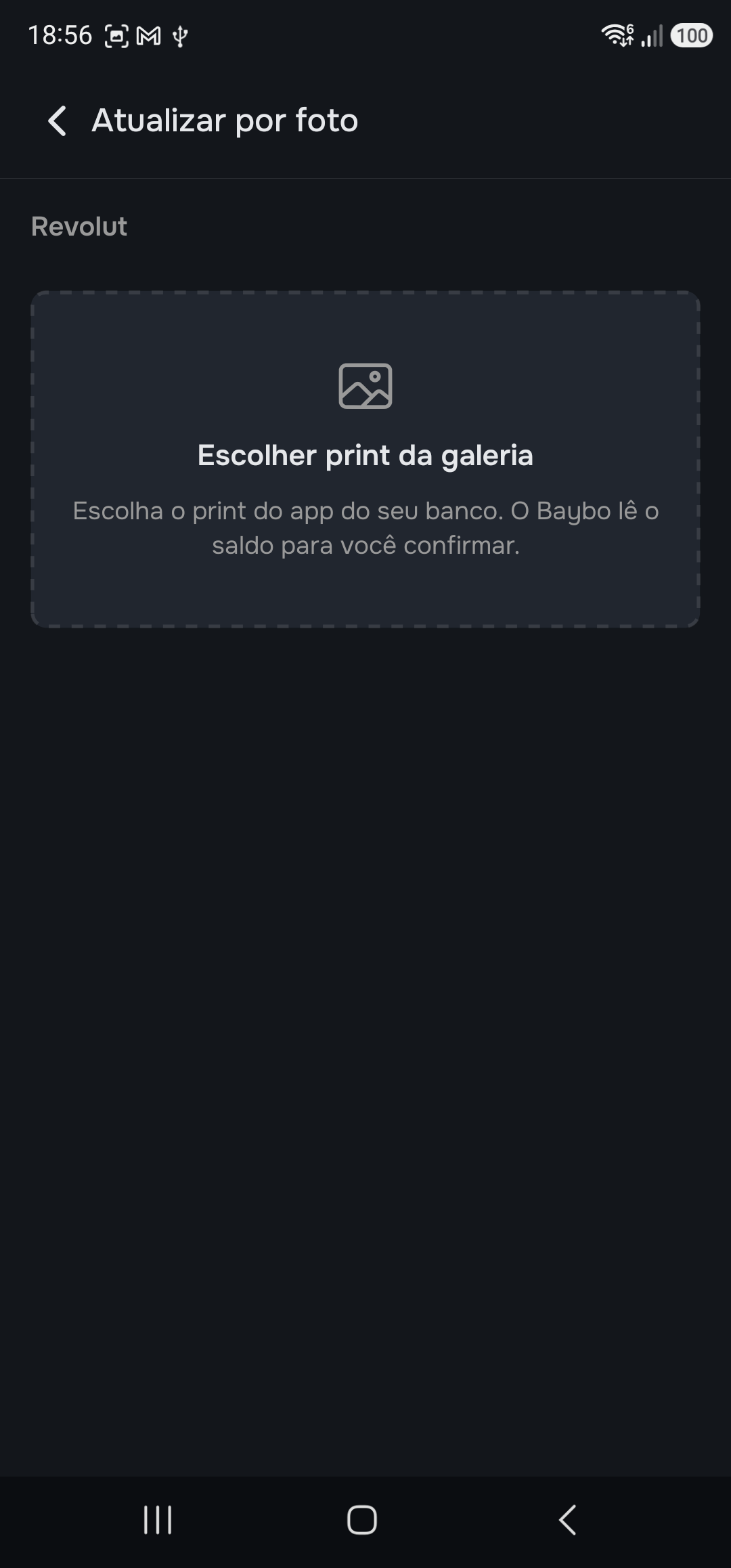
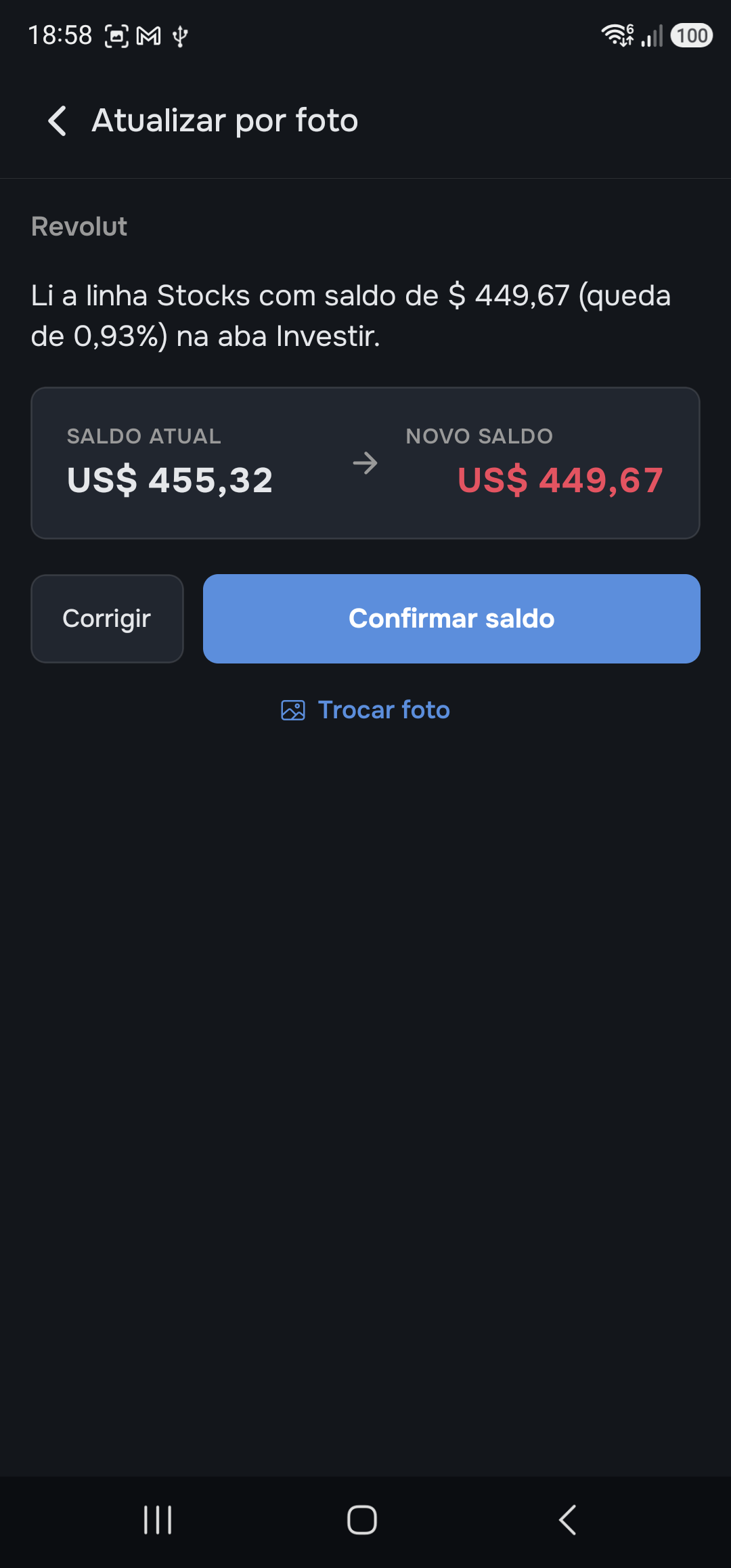
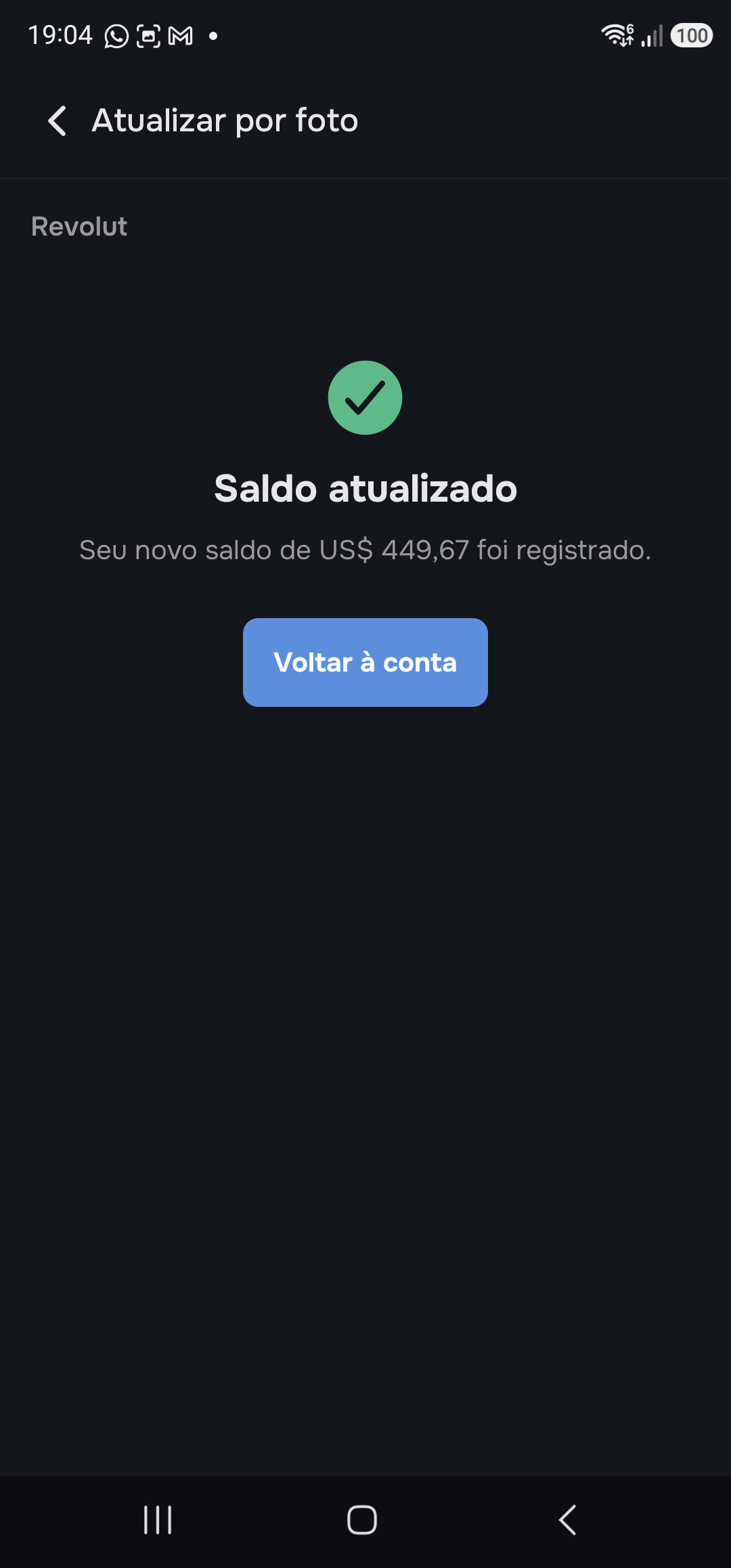
- Turn it on once (first time only): when creating the account (or in Edit account), under “Update balance by photo”, choose which screen of your bank you'll send a screenshot of and accept the reading.
- In the account statement, tap the 📷 next to the +.
- The gallery opens on its own. Choose the screenshot of the balance screen. Cancelled by accident? The screen looks like screenshot 3 — tap the box to open the gallery again.
- Baybo reads it and shows the change: current balance → new balance. Check it and tap “Confirm balance”.
- Done — the balance is recorded as if you'd typed it.
Couldn't read it? Baybo says so and shows an example of the right screenshot — or you correct the value by hand, without leaving the screen.
When Baybo is suspicious of a balance
A balance very different from the previous one contaminates every chart if it's wrong. So:
- Typed: Baybo asks — “This is quite different. Was it a return, or did you add/withdraw money?”. If it was a movement, it switches the form to deposit/withdrawal with the value filled in.
- By photo: Baybo locks and only lets you confirm after you correct the value by hand. The machine doesn't doubt its own number; you do.
The line stays flat at the last balance. And if too long goes by, Baybo reminds you: the little bell in the account statement sets up the reminder.
Step by step
Import a statement
Importing brings in, all at once, the deposits and withdrawals you've already made in an account — straight from the institution's statement (spreadsheet or PDF), without typing them one by one. Baybo reads the file, shows what it found, and you confirm what goes in.
It applies to a manual account (on a synced one, movements arrive on their own). And one detail: the statement brings movements, not the balance — after importing, record your current balance with the + (the other number, from Update the balance).
Path A — from the account statement
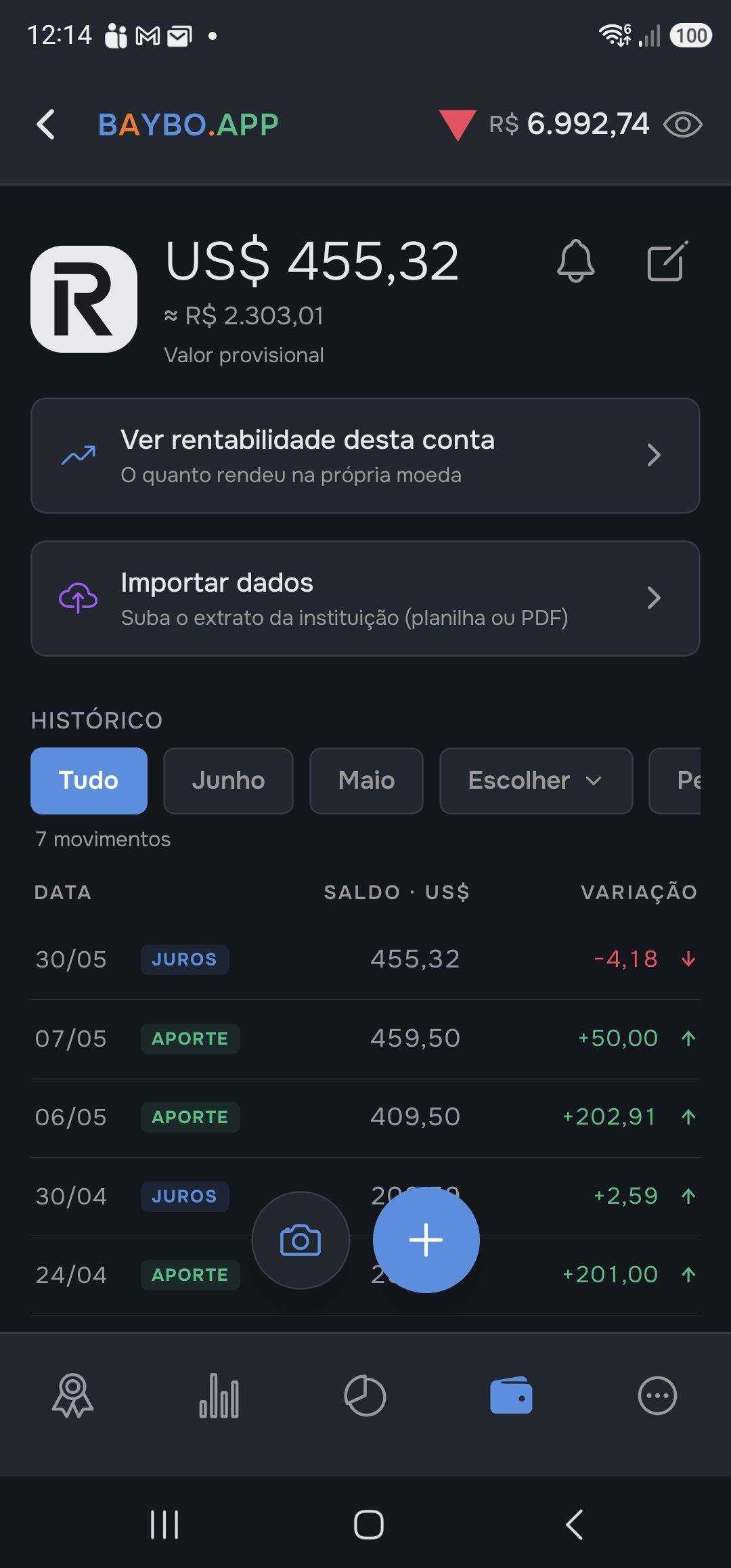
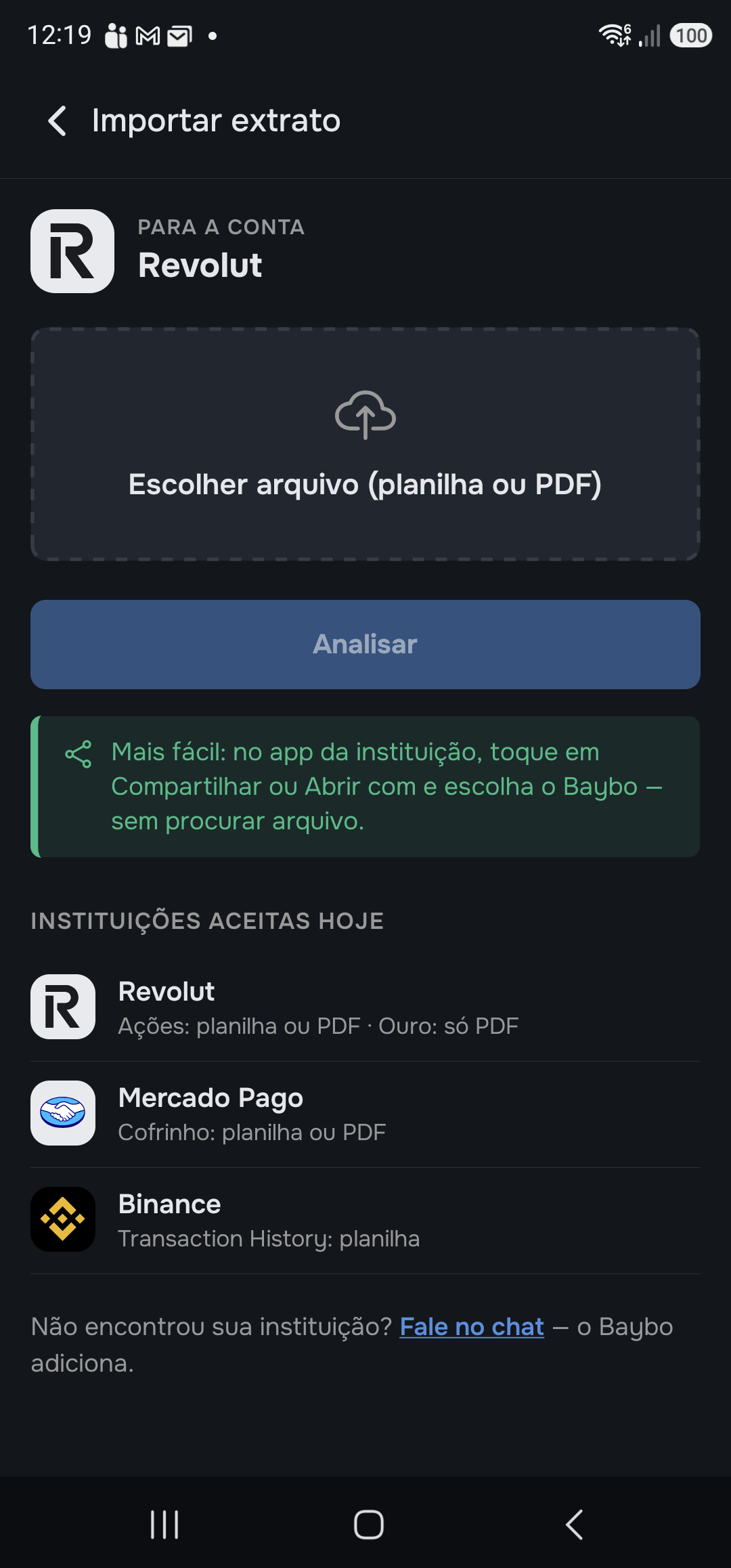
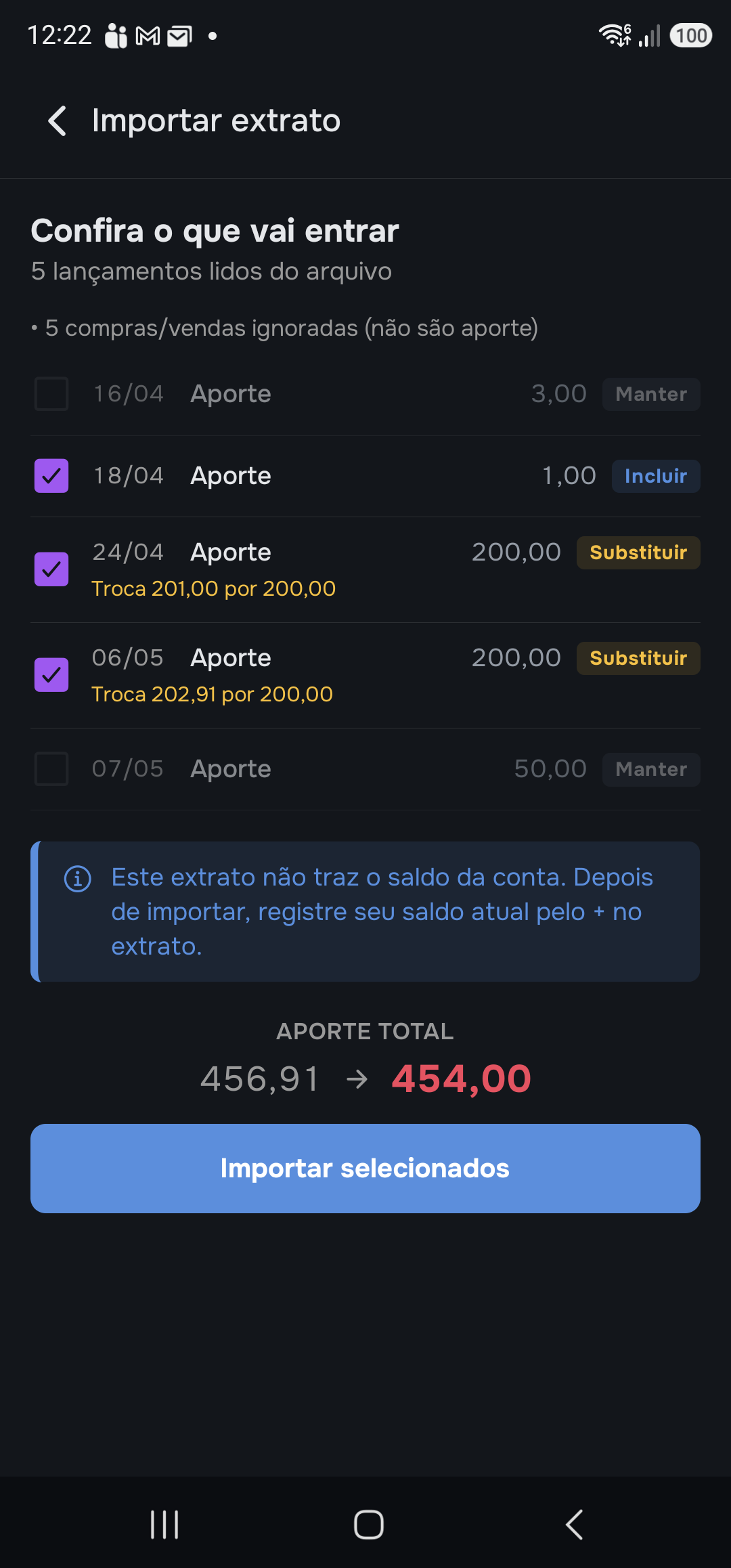

- In the account, tap the “Import data” card.
- Tap “Choose file” and select the statement (spreadsheet or PDF) you downloaded from the institution. You don't need to say which institution or format — Baybo recognizes it on its own from the content. The “Institutions accepted today” list is right below, with the “How to export?” link.
- Tap “Analyze” and check what's going in: each entry comes with a tag — Include (new), Replace (different from one that already exists) or Keep (same as what's already there) — and the footer shows Total deposits: before → after. Uncheck anything you don't want.
- Tap “Import selected”. Done.
Path B — via “Share”
On Android, instead of downloading the file and hunting for it later, send the statement straight from the institution:
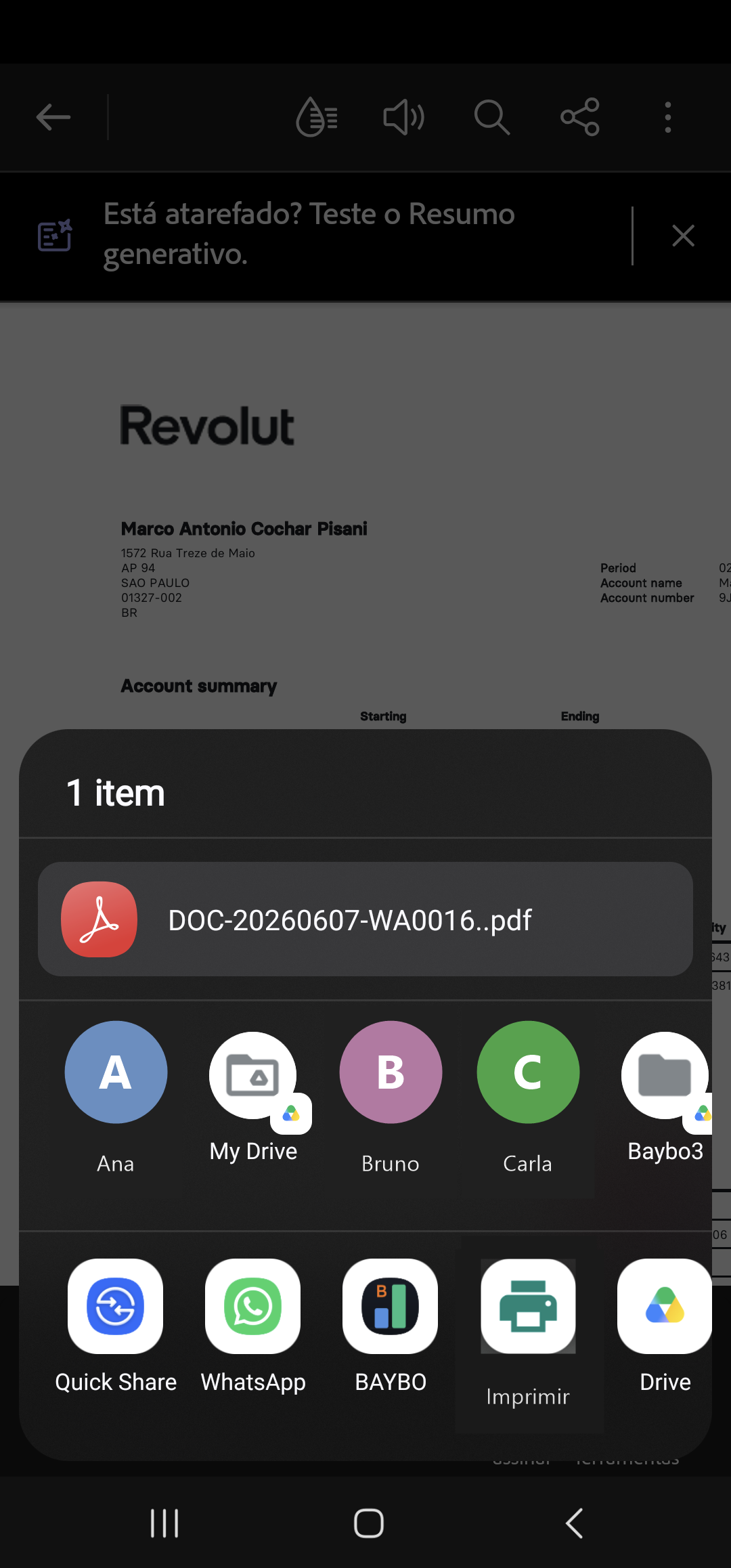
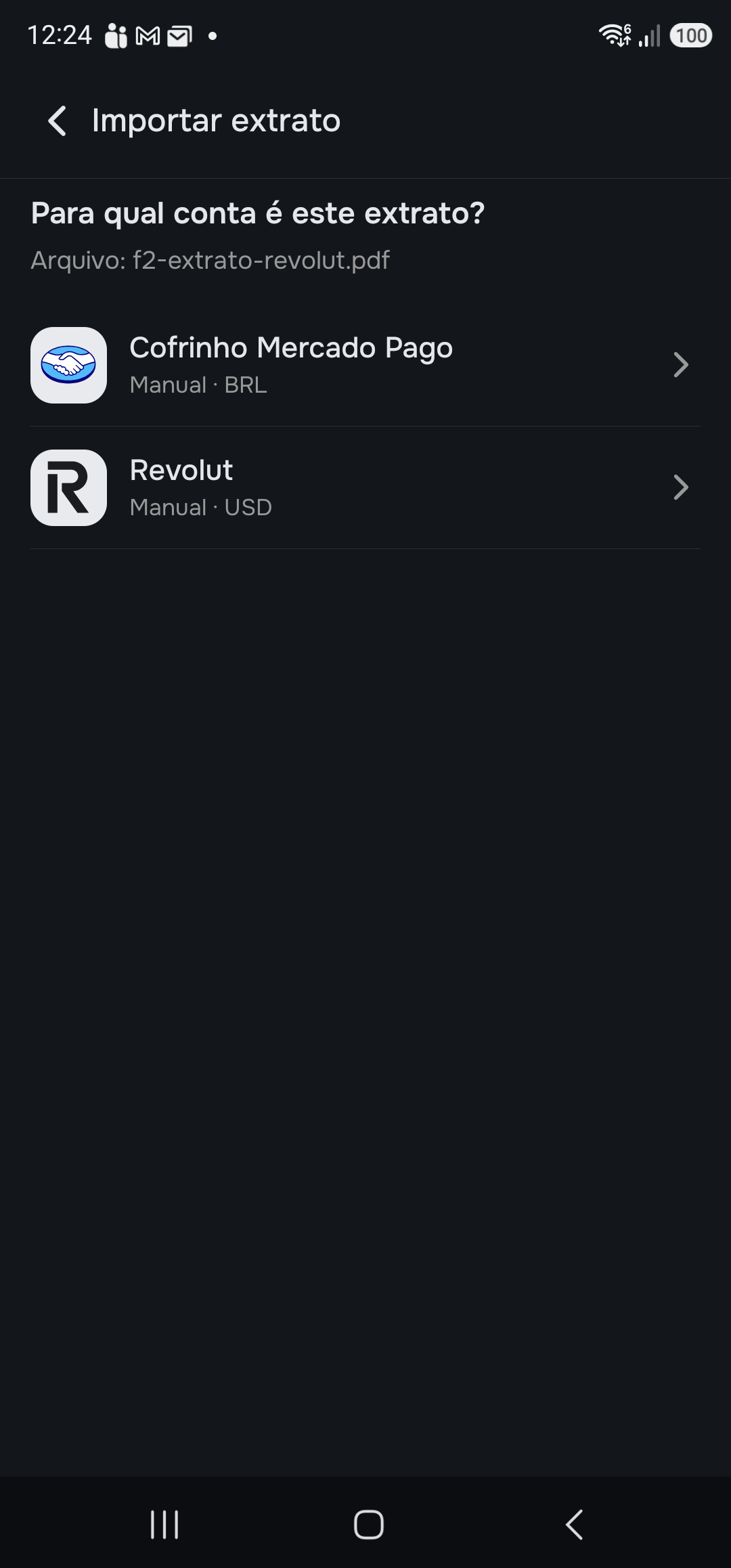
- In the institution's app (Revolut, Mercado Pago, Binance…), use Share or Open with and choose Baybo.
- Baybo asks “Which account is this statement for?” — choose the manual account.
- The import screen opens with the file already loaded: tap “Analyze” and follow the same as Path A.
What can go wrong
- Couldn't read the file: “I couldn't read this file. Check that it's the right statement from the institution.” With chat enabled, a “Contact support” link appears — Baybo keeps the file and adds the institution.
- Institution not on the list: a link “Message us in chat — Baybo adds it”.
- Ignored lines: buys, sells, internal transfers and cashback don't count (they're not deposits or withdrawals) — Baybo tells you how many it ignored.
- Conflict: a day that already has a balance or return doesn't take a movement (the “Conflict” tag).
The statement brings only deposits and withdrawals. For Baybo to know how much the account is worth today, record the balance with the + — it's the other number.
Step by step
Keeping track
Keeping track is the easy part — you just look. After adding your accounts and recording the balances, Baybo has already done the math. The Summary tab — the first one, home — answers the question from the start all at once: with the same money, on the same dates, are you earning more or less than if you hadn't gotten involved?
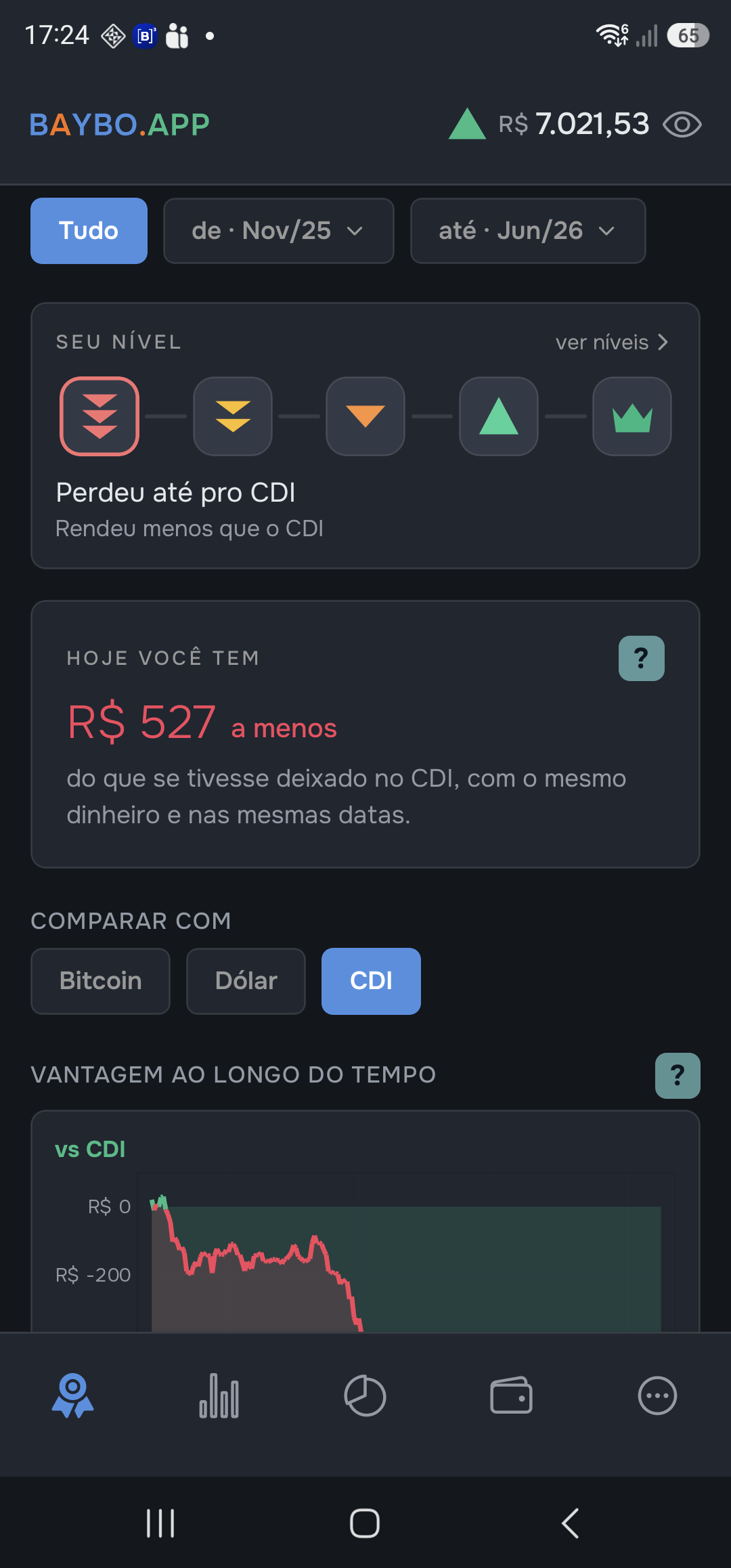
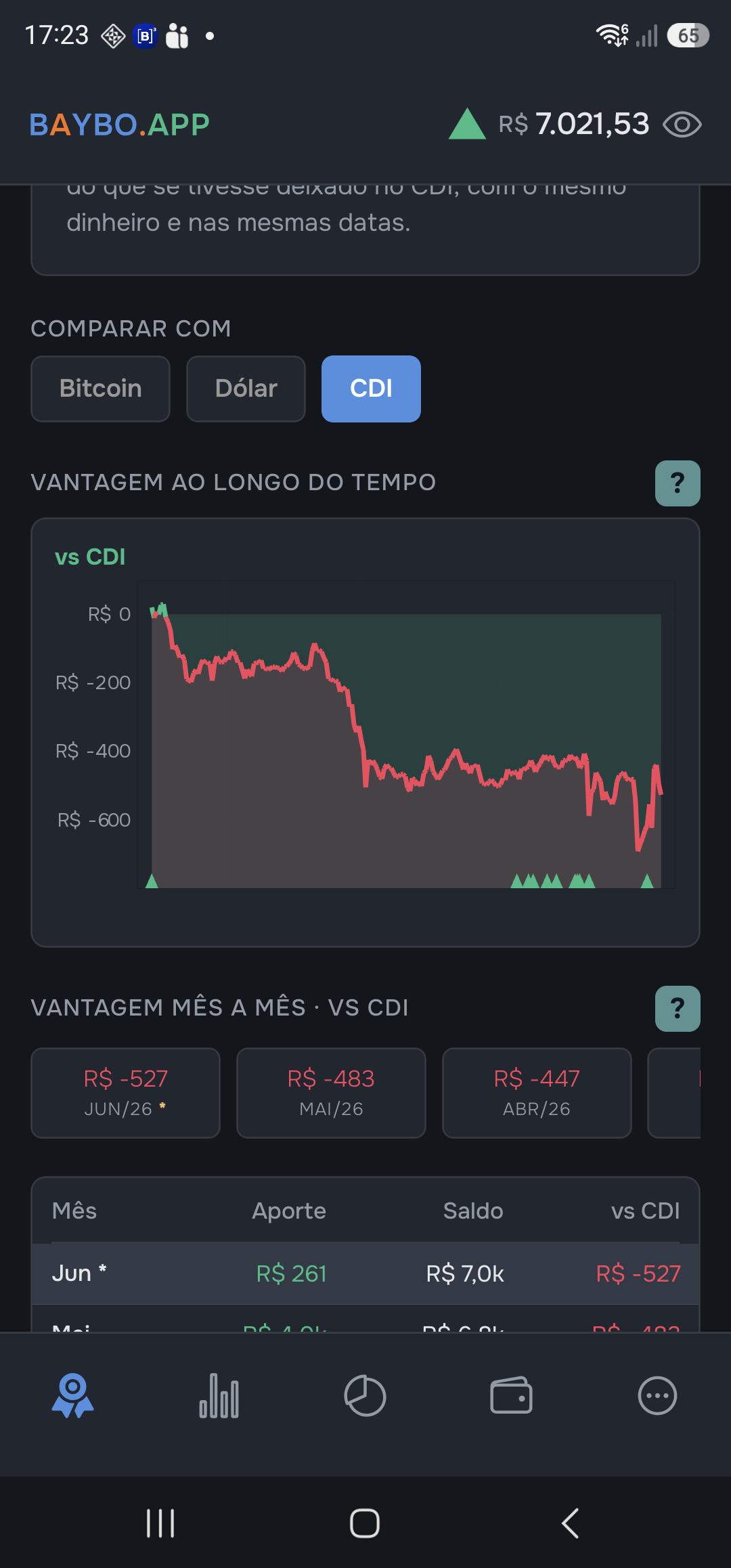
You don't need to do anything every day. Open it whenever you want to know. The screen reads top to bottom, in three blocks — the screenshots below frame where to look, not where to tap.
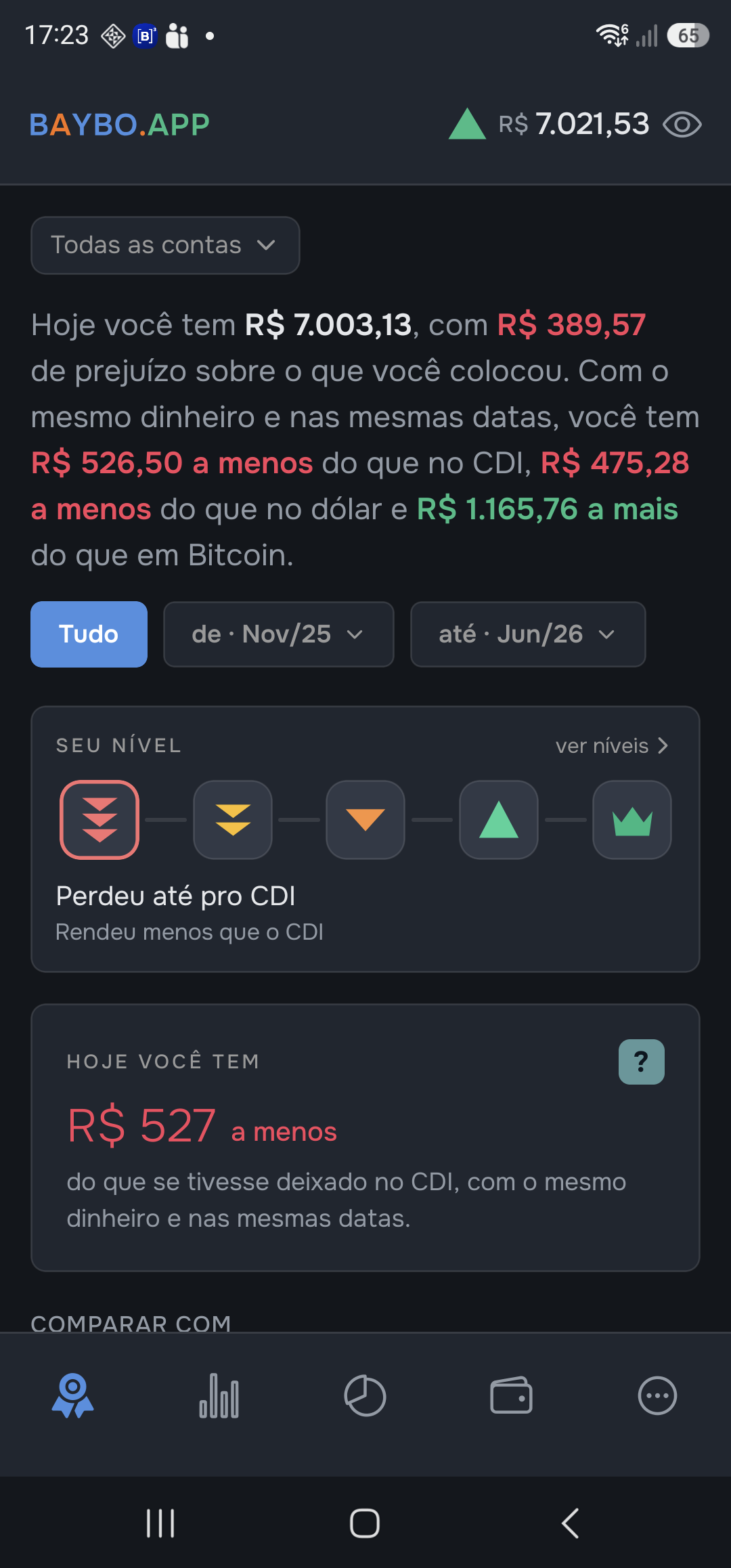
- The sentence. Right at the top, below your total for today, one sentence sums it all up in a single breath: “Today you have R$ X, with R$ Y in profit… you have R$ Z more than in the CDI and R$ W more than in the dollar.” It's your total, your profit (or loss) and the advantage in reais against the references — in words. The period selector just below changes the window: “All” shows the advantage since the start; a window shows how much you opened up (or lost) within it alone — your total stays the one for today.
- The Level and the headline. The ladder shows at a glance how far you've gotten: did you beat the CDI? the dollar? The more references you beat, the higher the level — from “Lost even to the CDI” to “Beat the references for 3 months”. Tap “see levels” for the whole ladder, with the criterion for each step. Just below, the headline repeats, in a big number, the advantage against the alternative that's closest on your heels: green when you're ahead, red when you're behind. The Level describes your result, never investment advice.
- The scoreboard. The CDI · Dollar buttons choose which alternative to look at. Below, the advantage in reais over time, with a line in the middle = break-even: above it you're ahead, below it, behind. The triangles at the base mark your deposits — note that a deposit does not create a step on the scoreboard, because both sides (your money and the alternative) receive the same money on the same day. Further down, the same advantage closed out month by month.
What to expect
- Negative advantage: Baybo shows it anyway. It's not to punish you; it's so you can decide, with the number in front of you, whether what you do is worth more than doing nothing.
- Not enough data yet: Baybo says you still need to add an account or record a balance — it never invents a verdict.
The advantage shows in reais because that's what hits your pocket. The same comparison in percentage — your return against the three alternatives — is in the Performance tab; pure equity — how much you have, how much you put in and how much is profit — in the Equity tab. And to see how Baybo arrives at these numbers, the appendix The math, in the open opens up the formulas.